Choosing the Right USB-C Charger for Phone, Tablet and Laptop
- 06 Oct, 2026
USB-C has become the standard connector for a huge range of devices, from phones and earbuds to tablets and laptops. In theory, that means one charger could power almost everything you own. In practice, chargers differ a lot in how much power they deliver and how they share it between devices. Picking the right one saves time, reduces clutter in your bag and helps your devices charge as quickly as they are designed to.
Start with wattage
The most important number on a charger is its power output, measured in watts (W). Each device can only draw as much power as it is designed for, so a more powerful charger will not harm a phone, but a weak charger can make a laptop charge very slowly or not at all.
- Phones and earbuds usually need a modest amount of power. Check your phone’s specifications to see the maximum charging speed it supports.
- Tablets often benefit from a little more power than a phone.
- Laptops need considerably more. Look at the original charger or the laptop’s specifications to see what wattage it uses, and choose a charger with at least that output.
If you want one charger for everything, choose one that can cover your most demanding device.
Power Delivery and fast charging
Most USB-C chargers use USB Power Delivery (often shortened to USB PD), a standard that lets the charger and device agree on the right voltage and current. Some phone makers also use their own fast charging systems. A USB PD charger will normally still charge these phones, but it may not reach the very highest speeds of the brand’s own charger.
When comparing chargers, look for USB PD support on the specification list, especially if you plan to charge a laptop.
Multi-port chargers and GaN
Multi-port chargers let you charge several devices from one wall socket, which is ideal for travel and desks. Keep in mind that the total wattage is shared between the ports. When you plug in a second or third device, each port usually gets less power than when it is used alone. The product details normally explain how the power is split.
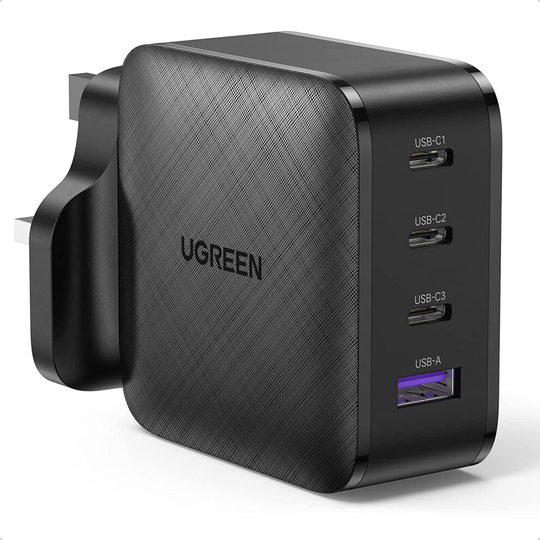
Many modern chargers use gallium nitride (GaN) components. GaN chargers can be smaller and run cooler than older designs with the same output, which makes them popular for travel. This 65W four-port GaN USB-C charger is an example of a compact charger that can handle a laptop and smaller devices together.
Do not forget the cable
A good charger can be held back by the wrong cable. USB-C cables are rated for different power levels, and a basic cable may limit how fast a laptop charges.
- Check the cable’s power rating, especially for laptops.
- Use cables from reputable brands and replace any that are frayed or damaged.
- Keep a short cable for the desk and a longer one for the bedside or sofa.
Safety and everyday tips
- Buy chargers with clear safety markings from trusted sellers, and avoid very cheap unbranded plugs.
- Do not cover chargers while they are in use, for example under pillows or blankets, as they need to release heat.
- Unplug chargers that feel unusually hot, smell of burning or show damage.
- For travel, check that the charger supports the local mains voltage and bring the right plug adapter.
Once you know the wattage you need and how many devices you want to charge, the choice becomes much simpler. Compare different options in our USB-C charger category.